
Sunday, May 3, 2015
Classroom Pictures! Neon and Awesome 80s
Welcome to my classroom! I had fun doing a neon & 80s theme this year! I love how bright & colorful it turned out.

When I first came into this room is was very sterile. Lots of GRAY! Here are some before pictures.
BEFORE:
 |
| A plus to this room is that the gray boards (not white boards) are magnetic. |
 |
| This is Bessie, the air conditioner. |
 |
| I was blessed to have a smartboard in this room! But again, GRAY BOARDS. They're supposed to work with both dry erase markers and chalk, but both erase horribly. I typically just use anchor charts with magnets up on them. |
 |
| Plus: Lots of cabinets! Minus: They're GRAY! |
Here are some pictures of how I spruced up this room!

I used different colored borders around my back boards to make it more colorful. Above each board are headers for the subjects. Below them is my picture book library.


Some of my organizational tubs from Really Good Stuff. Made some quick labels for them and glued them on.


One of my bulletin boards...


I bought the fans at Party City for $1.99 each and then hot glued my team signs to the middle of each fan.


Tuesday, March 17, 2015
Math Mini Packs!
Are you in need of some test prep ideas for Numbers in Base Ten? Try these Math Mini Packs.

Each pack comes with a PowerPoint, a note-taker for interactive notebooks, and a practice page. These can be done in small groups with a laptop, as whole group review, or as an intervention piece. Click the pictures below to see the products. :)


Read More »
Each pack comes with a PowerPoint, a note-taker for interactive notebooks, and a practice page. These can be done in small groups with a laptop, as whole group review, or as an intervention piece. Click the pictures below to see the products. :)
Saturday, March 7, 2015
Organizing My Geometry Unit
Hey guys! The big update is almost here for my geometry unit! It will go live tomorrow morning, but I wanted to share with you how I organized it for my classroom.


 Next comes the lesson plans! I like to keep them side-by-side so I don't have to flip back and forth. I structure my lessons like this: Page 1 is day 1 and Page 2 is day 2. Complicated, right? LOL


I take pictures and print them out of completed activities so I can remember what I did the previous year. I also print out what I want my anchor charts to look like so as we do them together I can remember what I want to include.

Center directions and materials are kept in the same sleeve until I'm ready to use them.


Any time I want my kids to take notes I like to have examples of what should be in them.
Here are a few other pictures:


Read More »
First, I like to keep my units in a binder with page protectors.
 |
| Print off the color cover for the binder cover. |
 |
| I use the black and white cover for my first page. |
 |
| Table of contents and standards list. |
^The reason why the standards look different is because I live in Florida and we "technically" don't have Common Core Standards. Ours are called Florida Standards... With the exception of a few, they're still word-for-word the Common Core Standards, lol.
I take pictures and print them out of completed activities so I can remember what I did the previous year. I also print out what I want my anchor charts to look like so as we do them together I can remember what I want to include.
Center directions and materials are kept in the same sleeve until I'm ready to use them.
I like to keep assessments and their keys together as well for easy grading.
Here are a few other pictures:
Organizing math units is all about what works for you. Above is how I put my centers out for display. I got this nifty sign holder at Office Max years ago. I like it for centers because if I need to make any tweaks I can do it with dry erase and then wipe it off for next year!
If you'd like to purchase my Geometry Unit, head over to my TPT Store!
Saturday, October 11, 2014
Double Digit Multiplication - Planning My Progressive Anchor Chart

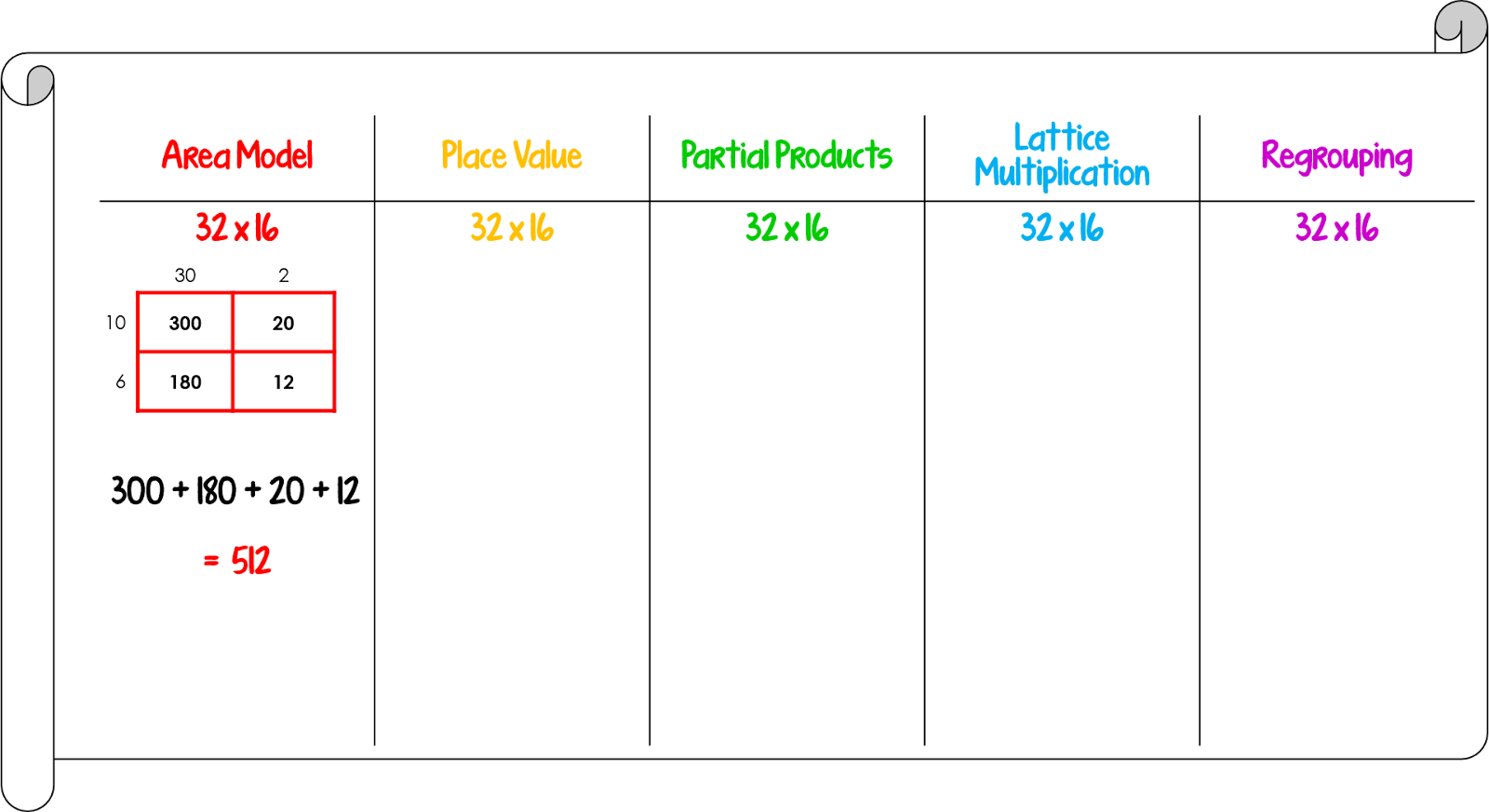
We've begun double digit multiplication! I wanted a way to do an anchor chart with all the different strategies we'll be using, but I didn't want to reveal them all at once - talk about overwhelming!

I decided to go with butcher paper for this chart and wrote out all the strategies across the top. As I teach each strategy, I'll put an example up on our chart.
I like to preplan my anchor charts in PowerPoint.

I type up examples of each and then save each as a picture. I then put the picture in my lesson plan so that I know what I'm putting on my chart each day and don't have to "wing it".

Below are my example pictures if you'd like to use them in your plans too!


Have a great week!

Wednesday, August 6, 2014
How to embed fonts in PowerPoint - Video Tutorial
So how many times have you made a PowerPoint using cute fonts and when your send it to a different computer it looks like this:

YUCK!
Here's a video tutorial on how to embed your fonts so that it looks nice no matter what computer you send it to.

Friday, August 1, 2014
Classroom sneak peek!

So excited about my room this year! Better pics coming soon! You can see my classroom pics in this post.
Subscribe to:
Posts (Atom)